Introduction
BloodHound is one of my favorite tools for auditing Active Directory attack paths. In the BloodHound v8.0 release, SpecterOps introduced BloodHound OpenGraph, enabling the community to ingest data from disparate systems and applications.
Over the past year, the community has published several OpenGraph extensions that expand BloodHound’s attack path management capabilities to systems such as AWS, GitHub, and Jamf. The full extension library is available here.
After seeing that success, I decided to build my own extension: ExchangeHound, focused on Microsoft Exchange on-premises environments. Its goal is to give blue teams a graph-based way to identify abuse paths related to T1098.002 - Account Manipulation: Additional Email Delegate Permissions and other Exchange mailbox abuse paths.
In this post, I’ll walk through how ExchangeHound models Exchange mailbox permissions in OpenGraph and how those relationships can be used to uncover real attack paths.
Why Exchange Delegation Matters
Before diving into the schema, it helps to define the problem in practical terms: Exchange delegation rights are often distributed across large environments and are difficult to reason about in isolation. Permissions like FullAccess, SendAs, and SendOnBehalf may each look harmless on their own, but when combined with existing AD relationships they can form high-impact privilege chains. The same is true for delegated folder access (for example, shared Inbox permissions), which can be abused for stealthy monitoring and persistence. ExchangeHound treats these permissions as graph relationships so they can be analyzed the same way as traditional BloodHound edges.
You can read a great article on this here: POL Cyber Command has observed malicious activity against Microsoft Exchange servers
Data Model
ExchangeHound extends BloodHound with Exchange-specific nodes and relationships so mailbox abuse can be analyzed as part of the same identity graph. The model includes objects such as ExchangeMailbox, ExchangeMailboxFolder, ExchangePublicFolder, ExchangeTransportRule, and ExchangeRbacRole, connected by edges like HasFullAccess, HasSendAs, HasSendOnBehalf, HasFolderAccess, HasCalendarAccess, and HasPublicFolderAccess. By mapping these permissions into OpenGraph, we can move from isolated ACL review to path-based analysis that shows how Exchange rights combine with existing AD relationships.
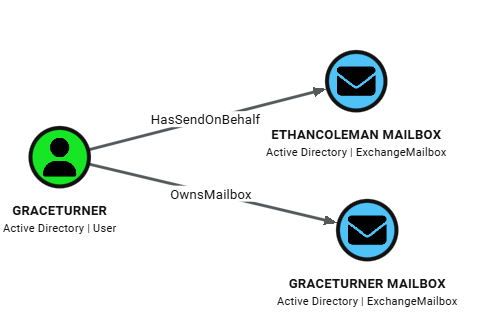
At the center of the model is the ExchangeMailbox node, which is linked back to identity through OwnsMailbox (owner mapping) and to delegation principals through mailbox permission edges. This makes mailbox ownership explicit in the graph and allows us to immediately separate expected access from non-owner access.
This sample query maps user GraceTurner to Mailboxes:
MATCH p=(u:User)-[:OwnsMailbox|HasFullAccess|HasSendAs|HasSendOnBehalf]->(mb:ExchangeMailbox)
WHERE u.samaccountname = 'GraceTurner'
RETURN p
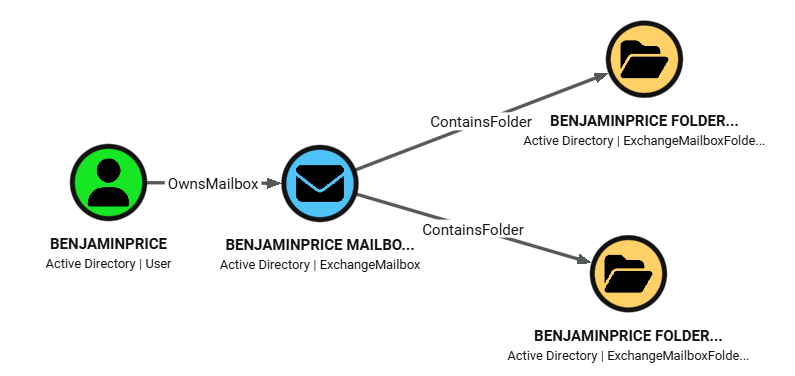
ExchangeHound then adds depth with folder-level objects. ExchangeMailboxFolder nodes are connected to their parent mailbox via ContainsFolder, and principals can reach those folders through HasFolderAccess or HasCalendarAccess edges. Those edges preserve rights metadata (for example accessrights and calendar sharingpermissionflags), so analysts can distinguish broad mailbox compromise from more selective access such as Inbox-only or Calendar-only delegation.
This sample query maps folders in BenjaminPrice mailbox:
MATCH p=(u:User)-[:OwnsMailbox]->(mb:ExchangeMailbox)-[:ContainsFolder]->(f:ExchangeMailboxFolder)
WHERE u.samaccountname = 'BenjaminPrice'
RETURN p
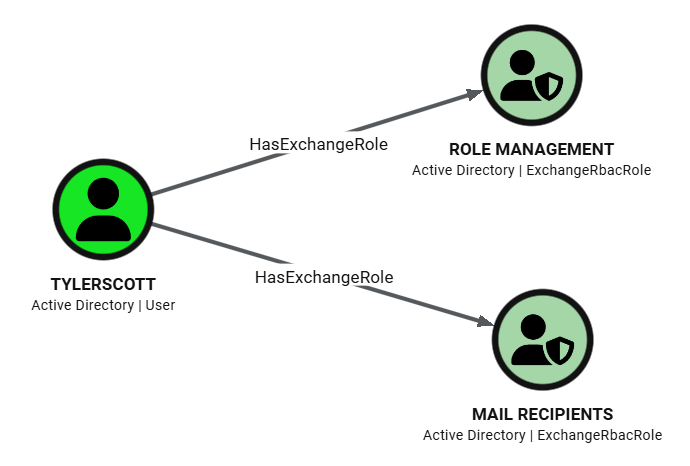
For visibility beyond mailbox ACLs, the model also includes message-flow and admin-control surfaces. ExchangeTransportRule nodes connect sender conditions (TriggeredBySender) and recipient/action targets (AffectsRecipient), including synthetic ExchangeTransportEndpoint nodes for unresolved external SMTP destinations. ExchangeRbacRole nodes connected through HasExchangeRole represent Exchange administrative assignments with assignment metadata and scope fields, which helps identify persistence or privilege expansion paths in management-plane access.
This sample query shows Exchange RBAC roles for user TylerScott.
MATCH p=(principal)-[r:HasExchangeRole]->(role:ExchangeRbacRole)
WHERE principal.samaccountname = 'TylerScott'
RETURN p
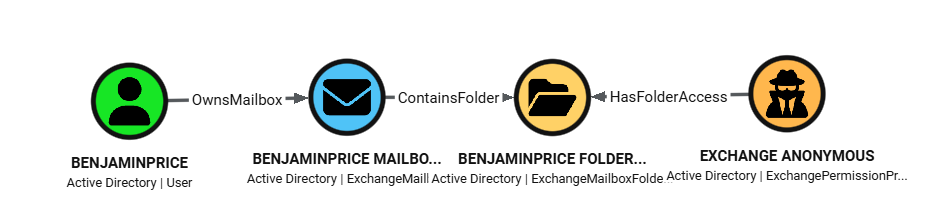
Identity mapping is designed to merge cleanly with existing SharpHound data. Trustee resolution attempts SID-based AD lookups first and uses match_by: "id" to attach Exchange edges directly to existing AD users/groups/computers. For Exchange-only principals like Default and Anonymous, ExchangeHound creates ExchangePermissionPrincipal nodes instead of dropping the relationship, preserving exposure paths that would otherwise be invisible in AD-only graphs.
This sample query shows Folders in Mailboxes that have anonymous access enabled.
MATCH p=(anon:ExchangePermissionPrincipal)-[r:HasFolderAccess]->(folder:ExchangeMailboxFolder)<-[:ContainsFolder]-(mb:ExchangeMailbox)<-[:OwnsMailbox]-(owner:User)
WHERE toLower(anon.displayname) = 'anonymous'
RETURN p
Data Collection Pipeline
At a high level, the workflow is: run ExchangeHound on an on-prem Exchange host, generate OpenGraph JSON, prepare BloodHound for custom model ingestion, and then import the dataset either through the UI or through API scripts.
- Run collector on Exchange on-prem server
- Run from Exchange Management Shell (or remote EMS session), with AD resolution available.
- Start with a pilot scope, then expand to full collection.
# pilot
.\ExchangeHound.ps1 -ResultSize 100 -SkipSendOnBehalf -OutputPath .\exchangehound_pilot.json

# full coverage
.\ExchangeHound.ps1 -CollectAll -OutputPath .\exchangehound_full.json
- Prepare BloodHound for OpenGraph data
- Ensure your BloodHound deployment is using the PostgreSQL/OpenGraph path (PG) instead of Neo4j mode.
- Upload the ExchangeHound custom model before ingesting data, so custom nodes/edges render correctly.
python update_custom_nodes_to_bloodhound.py -s https://bloodhound.example.com -u <user> -p <pass> -m model.json
- Import ExchangeHound output
- GUI path:
Administration -> File Ingestand uploadExchangeHound_*.json. - Script/API path: use the uploader script for repeatable ingestion pipelines.
- GUI path:
python upload_exchangehound_data_to_bloodhound.py -s https://bloodhound.example.com -u <user> -p <pass> -f ExchangeHound_YYYYMMDD_HHMMSS.json
More details can be found on the GitHub repository for ExchangeHound.
Threat Hunting Ideas
Below are practical hunts based only on the data I’ve generated in my lab.
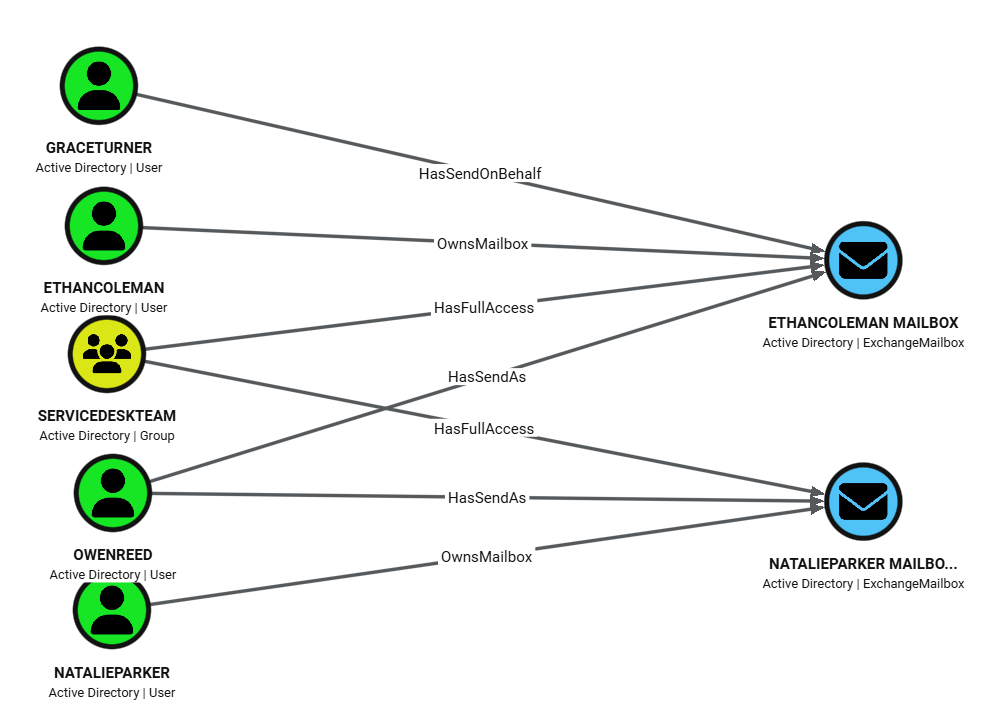
1) Non-owner access to executive mailboxes
Use this to find delegates with privileged access to executive mailboxes (EthanColeman, NatalieParker).
MATCH p=(delegate)-[:HasFullAccess|HasSendAs|HasSendOnBehalf]->(mb:ExchangeMailbox)<-[:OwnsMailbox]-(owner:User)
WHERE mb.displayname IN ['EthanColeman', 'NatalieParker']
  AND delegate <> owner
RETURN p
2) Kerberoastable service account with mailbox control
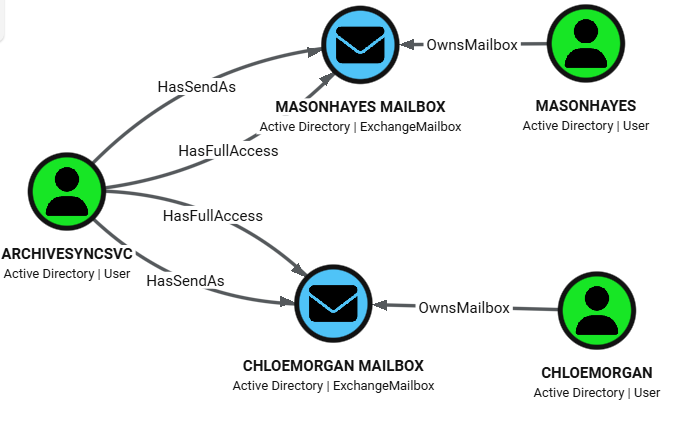
Use this to identify principals with SPN set and mailbox takeover rights. ArchiveSyncSvc has both mailbox and impersonation-style rights to user mailboxes.
MATCH p=(u:User)-[:HasFullAccess|HasSendAs]->(mb:ExchangeMailbox)<-[:OwnsMailbox]-(owner:User)
WHERE u.hasspn
RETURN p
3) Inbox-level permissions via folder ACLs
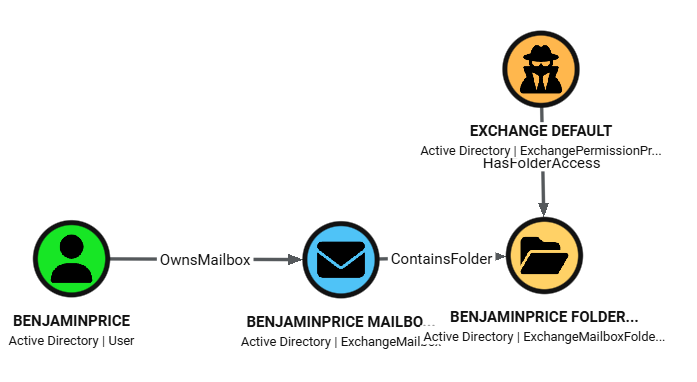
Use this to detect selective inbox monitoring (folder-level access) instead of full mailbox compromise.
MATCH p=(delegate)-[:HasFolderAccess]->(folder:ExchangeMailboxFolder)<-[:ContainsFolder]-(mb:ExchangeMailbox)<-[:OwnsMailbox]-(owner:User)
WHERE toLower(coalesce(folder.folderpath, '')) CONTAINS 'inbox'
RETURN p
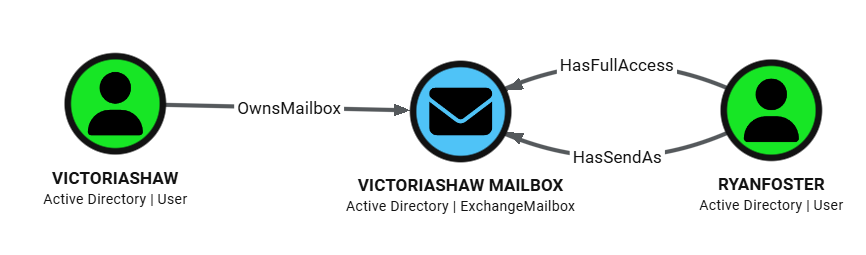
4) Disabled user with lingering mailbox rights (orphaned access)
Use this to surface stale permissions from deprovisioning failures. In example RyanFoster is disabled but still delegated to VictoriaShaw.
MATCH p=(delegate:User)-[:HasFullAccess|HasSendAs]->(mb:ExchangeMailbox)<-[:OwnsMailbox]-(owner:User)
WHERE delegate.enabled = false
RETURN p
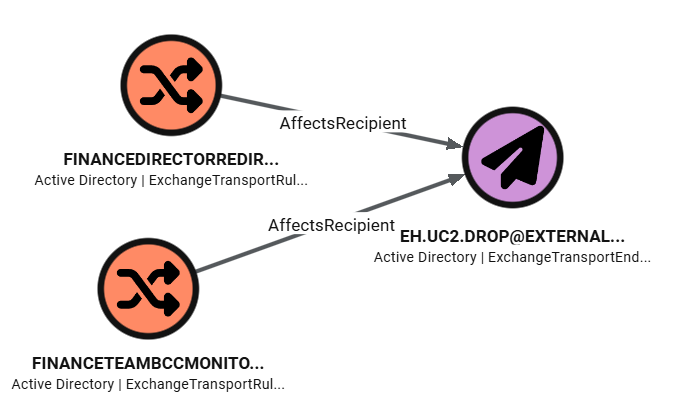
5) Transport-rule exfiltration paths
Use this to trace mail flow rules that route or copy messages to external endpoints.
MATCH p=(rule:ExchangeTransportRule)-[:AffectsRecipient]->(endpoint:ExchangeTransportEndpoint)
RETURN p
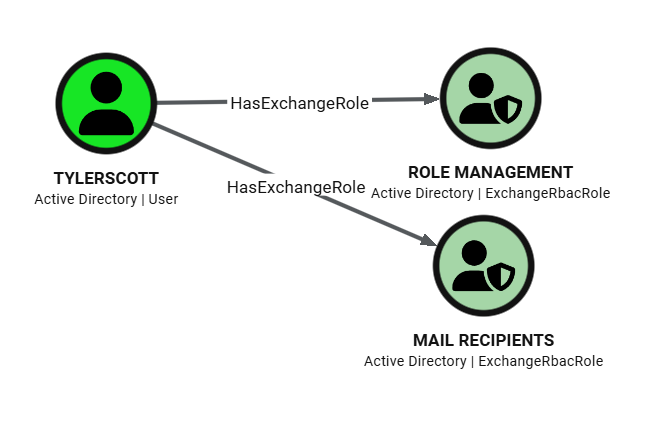
6) Overly privileged Exchange RBAC roles on user principals
Use this to identify users with high-impact Exchange administrative roles.
MATCH p=(principal:User)-[:HasExchangeRole]->(role:ExchangeRbacRole)
WHERE toLower(coalesce(role.displayname, '')) IN [
    'organization management',
    'recipient management',
    'role management',
    'organization configuration',
    'organization client access',
    'mail recipients',
    'mail recipient creation',
    'recipient policies'
  ]
RETURN p
Conclusion
Publishing ExchangeHound on GitHub is an important milestone for me. It may not be perfect, but I hope it will be useful for investigations, especially after mailbox or Exchange Server compromise. I built it in my free time and tested it in a lab running Exchange 2019. I hope it also works well across other supported Exchange versions.
I may add Exchange Online support in my spare time.
- ExchangeHound GitHub: github.com/FilipPwn/exchangehound
- ExchangeHound sample data and scenarios: github.com/FilipPwn/exchangehound_samples