Introduction
I was recently at x33fcon in Gdynia, where Erkan Ekici and Shanti Lindström presented Offensive SIEM: When the Blue Team Switches Perspective.
The part that stuck with me was simple: a SIEM is not only for alerting on malware, beacons and known attacker behavior. Defenders can also use it offensively: search for vulnerable conditions, weak permissions and risky execution paths across thousands of endpoints.
After the conference I started to go through their repository: github.com/Ekitji/siem. It is full of practical hunting ideas for local privilege escalation primitives: services in writable paths, scheduled tasks pointing to risky directories, DLL loads from user-writable locations, OpenSSL config issues, Procmon-style filters and other small things that get interesting when you can query them at fleet scale.
I tried some of those ideas in my environment and found enough signal to build a small lab with harmless payloads.
In this post I will do four things:
- Start with a generic ES|QL query that hunts for some class of issues.
- Narrow it down to a concrete candidate.
- Confirm the vulnerable condition with OSQuery.
- Use Elastic Defend response actions for validation.
The focus is exposure hunting: finding the conditions that make exploitation possible before somebody abuses them.
Why This Repository Is Useful
The Ekitji/siem repository is a collection of practical hunting patterns. Most of them are not polished detection rules. They are closer to research notes and battle-tested queries: what to look for, which paths matter, which Windows events help and what to confirm manually. A threat hunter can put on a red-team cap. It feels like running WinPEAS across every endpoint you have in the SIEM.
Many LPE bugs start with conditions such as:
- a service running as
LocalSystemfrom a directory regular users can modify - a scheduled task running with high privileges from
C:\ProgramData - a privileged process loading a DLL from a user-writable directory
- an OpenSSL library reading config or providers from a writable default path
None of those conditions is malicious by itself. At scale, though, they are strong hunting targets. Sometimes this is how you find a CVE before there is a clean detection rule for it.
The repository has good starting points for this, for example:
- Service executables in user-writable paths
- Scheduled tasks from user-writable paths
- Generic DLL load from user-writable paths
- OpenSSL config usage
- Known vulnerable OpenSSL default paths
- Procmon-style LPE queries
I translated a few patterns into ES|QL and tested them in Elastic Security.
The Lab
I built three small reproductions. They do not ship any real vulnerable vendor binary. They only recreate the conditions I want to hunt.
| Lab | Primitive | Signal |
|---|---|---|
| 01 | writable service binary | SYSTEM service path is user-writable |
| 02 | DLL sideload via scheduled task | SYSTEM task uses a user-writable app dir |
| 03 | writable OpenSSL config/provider path | privileged OpenSSL uses writable config/provider path |
Telemetry in the lab:
- Windows System and Security logs
- Sysmon with
Sysmon Modularconfig - OSQuery Manager
- Elastic Defend telemetry + response actions
The lab paths are intentionally obvious, but the shape is close to vendor application paths seen in real environments.
C:\ZUSLAB\App\Uslugi
C:\ProgramData\Lenovo\TPQM\Assistant
C:\usr\local\ssl
The Workflow
I used the same workflow for every case:
- Generic ES|QL to find the exposure class across the fleet.
- Focused ES|QL to zoom into one path, process or host.
- OSQuery to confirm the live vulnerable state: ACL, service/task config, hash and Authenticode.
- Elastic Defend execute to run read-only validation commands on the endpoint.
Order matters. If we start with icacls on one host, we are doing manual triage. If we start with ES|QL across the fleet, we are hunting.
I do not want this to depend on one data source. Elastic Defend endpoint.events.* gives a good normalized view of process, file and library activity. Sysmon and Windows Security logs add another angle: process creation, image load, file create, registry changes and scheduled task creation. The examples below switch between those sources instead of repeating the same idea from one index.
The lab has exploit markers only to prove that the reproduction works. In a real hunt I would usually stop at the exposure evidence: privileged execution path, writable ACL, task or service config, and signer/hash context. Compromise traces are still useful, but they are the second question, not the first one.
Hunt 1: Privileged Process From a Risky Path
The first hunt is based on the Ekitji idea of finding privileged process creation from user-writable paths:
- Service executables in user-writable paths
- Process creation by SYSTEM in user-writable paths
- Process creation by SYSTEM in C-root subfolder
Generic ES|QL:
FROM logs-endpoint.events.process-*
| WHERE event.action == "start"
| EVAL exe = TO_LOWER(process.executable),
       parent = TO_LOWER(process.parent.name),
       user_l = TO_LOWER(user.name),
       integrity = TO_LOWER(process.Ext.token.integrity_level_name)
| WHERE user_l IN ("system", "local service", "network service") OR integrity == "system"
| WHERE parent IN ("services.exe", "svchost.exe", "taskhostw.exe")
| WHERE exe LIKE ("*programdata*", "*users*", "*temp*") OR (exe LIKE "c:*" AND NOT exe LIKE ("c:*windows*", "c:*program files*"))
| WHERE NOT exe LIKE "*microsoft*windows defender*"
| STATS events = COUNT(*), hosts = COUNT_DISTINCT(host.name), first_seen = MIN(@timestamp), last_seen = MAX(@timestamp)
  BY process.executable, process.name, process.parent.name, user.name, process.Ext.token.integrity_level_name
| SORT events DESC
This is still broad, but the process.parent.name filter removes a lot of random elevated installer noise. I want service and scheduled-task style launches first, not every admin install from %TEMP%.
This first view uses Elastic Defend process telemetry. Later I cross-check the same chain with Sysmon.
Fields I check first:
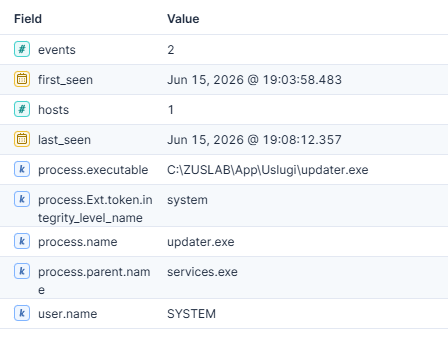
process.parent.name == "services.exe", which usually means service pathprocess.parent.name == "svchost.exe"with Schedule context, which usually means scheduled taskprocess.parent.name == "taskhostw.exe", which can also appear in scheduled-task chainseventsandhosts, to see if it is a one-off or fleet-wide exposure- executable path outside normal protected directories
In my lab this points to the service primitive:
| executable | parent | user | integrity |
|---|---|---|---|
C:\ZUSLAB\...\updater.exe |
services.exe |
SYSTEM |
system |
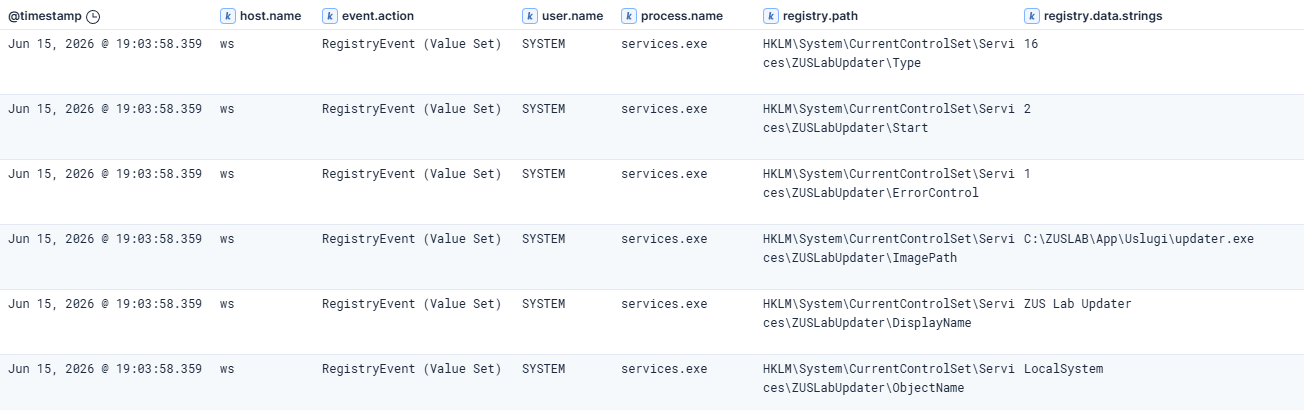
Then I cross-check the same service registration with Sysmon registry telemetry. At this stage I am still confirming the vulnerable condition, not looking for exploitation yet:
FROM logs-windows.sysmon_operational-*
| WHERE event.code == "13"
| EVAL pe = TO_LOWER(process.executable), rp = TO_LOWER(registry.path), rd = TO_LOWER(registry.data.strings)
| WHERE rp LIKE "*zuslabupdater*" OR rd LIKE "*zuslab*app*uslugi*"
| KEEP @timestamp, host.name, event.code, event.action, user.name, process.name, process.executable, registry.path, registry.data.strings
Sysmon view:
| code | action | user | process | registry.data.strings |
|---|---|---|---|---|
13 |
Registry value set |
SYSTEM |
services.exe |
C:\ZUSLAB\...\updater.exe |
13 |
Registry value set |
SYSTEM |
services.exe |
LocalSystem |
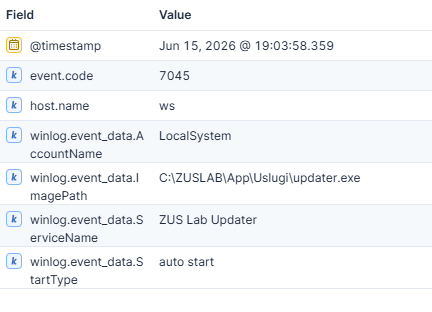
Windows service-install telemetry gives another useful confirmation. Event 7045 comes from the System channel and shows the service path, account and start type:
FROM logs-system.system-*
| WHERE event.code == "7045"
| EVAL svc = TO_LOWER(winlog.event_data.ServiceName), image = TO_LOWER(winlog.event_data.ImagePath)
| WHERE svc LIKE "*zuslab*" OR image LIKE "*zuslab*"
| KEEP @timestamp, host.name, event.code, winlog.provider_name, winlog.event_data.ServiceName, winlog.event_data.ImagePath, winlog.event_data.AccountName, winlog.event_data.StartType
System view:
| code | service | image | account | start |
|---|---|---|---|---|
7045 |
ZUS Lab Updater |
C:\ZUSLAB\...\updater.exe |
LocalSystem |
auto start |
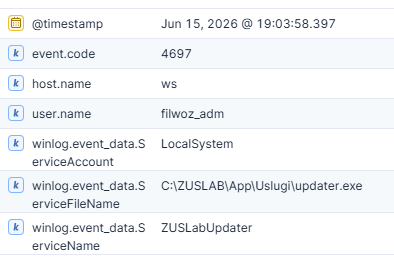
If Security Auditing for service installation is enabled, event 4697 is also useful:
FROM logs-system.security-*
| WHERE event.code == "4697"
| EVAL svc = TO_LOWER(winlog.event_data.ServiceName), image = TO_LOWER(winlog.event_data.ServiceFileName)
| WHERE svc LIKE "*zuslab*" OR image LIKE "*zuslab*"
| KEEP @timestamp, host.name, event.code, user.name, winlog.event_data.ServiceName, winlog.event_data.ServiceFileName, winlog.event_data.ServiceAccount
Security view:
| code | user | service | image | account |
|---|---|---|---|---|
4697 |
filwoz_adm |
ZUSLABUpdater |
C:\ZUSLAB\...\updater.exe |
LocalSystem |
At this point the telemetry says:
- a service points to
C:\ZUSLAB\App\Uslugi\updater.exe - the service runs as
LocalSystem - Endpoint saw the service path execute as
SYSTEM
That is enough to justify live confirmation of the permissions.
OSQuery:
SELECT path, principal, type, access
FROM ntfs_acl_permissions
WHERE path = 'C:\ZUSLAB\App\Uslugi'
  AND principal IN ('Authenticated Users','BUILTIN\Users','Users','Everyone');
SELECT s.name, s.path, s.start_type, s.user_account, a.result AS authenticode
FROM services s
LEFT JOIN authenticode a ON s.path = a.path
WHERE s.name = 'ZUSLABUpdater';
OSQuery result:
Service configuration:
| service | path | start | account | signature |
|---|---|---|---|---|
ZUSLABUpdater |
C:\ZUSLAB\...\updater.exe |
AUTO_START |
LocalSystem |
missing |

Directory ACL:
| path | principal | access |
|---|---|---|
C:\ZUSLAB\...\Uslugi |
Users |
Specific Rights All,Delete,... |
C:\ZUSLAB\...\Uslugi |
Authenticated Users |
Generic Write,Generic Read,... |

Elastic Defend read-only validation command:
This is the same confirmation path, but from the endpoint response channel:
cmd.exe /c sc qc ZUSLABUpdater & icacls C:\ZUSLAB\App\Uslugi & icacls C:\ZUSLAB\App\Uslugi\updater.exe
Validation output:
[SC] QueryServiceConfig SUCCESS

SERVICE_NAME: ZUSLABUpdater
        START_TYPE         : 2   AUTO_START
        BINARY_PATH_NAME   : C:\ZUSLAB\App\Uslugi\updater.exe
        DISPLAY_NAME       : ZUS Lab Updater
        SERVICE_START_NAME : LocalSystem

C:\ZUSLAB\App\Uslugi BUILTIN\Users:(OI)(CI)(M)
                     NT AUTHORITY\Authenticated Users:(OI)(CI)(M)
                     [...]

C:\ZUSLAB\App\Uslugi\updater.exe BUILTIN\Users:(I)(M)
                                 NT AUTHORITY\Authenticated Users:(I)(M)
                                 [...]
Only after confirming the exposure I look for signs that somebody may have exploited it. For this primitive that means a low-privileged write to the service binary path.
Generic ES|QL for low-privileged writes of executable or config material:
FROM logs-endpoint.events.file-*
| EVAL path = TO_LOWER(file.path), user_l = TO_LOWER(user.name)
| WHERE file.extension IN ("exe", "dll", "sys", "ps1", "bat", "cmd", "cnf", "config", "json")
| WHERE path LIKE "*programdata*" OR path LIKE "*users*" OR path LIKE "*temp*" OR path LIKE "*usr*local*ssl*" OR path LIKE "*etc*ssl*"
| WHERE NOT user_l IN ("system", "local service", "network service", "trustedinstaller")
| KEEP @timestamp, host.name, user.name, event.action, process.name, process.executable, file.path, file.extension, file.hash.sha256
Focused lab query:
FROM logs-endpoint.events.file-*
| EVAL path = TO_LOWER(file.path)
| WHERE path LIKE "*zuslab*app*uslugi*"
| KEEP @timestamp, host.name, user.name, event.action, process.name, process.executable, file.path, file.hash.sha256
Lab hit:
| @timestamp | user | action | process | path |
|---|---|---|---|---|
2026-06-15 17:07:42 |
filwoz |
creation |
powershell.exe |
C:\ZUSLAB\...\updater.exe |

This shows a low-privileged user wrote updater.exe with PowerShell by exploiting the vulnerable ACLs.
Hunt 2: DLL Load From a User-Writable Path
The second primitive is DLL sideloading. These Ekitji queries map well to it:
- Generic DLL load from user-writable paths
- DLL load from temp directory
- Procmon schedule task process in user-writable path
Generic ES|QL:
FROM logs-endpoint.events.library-*
| EVAL path = TO_LOWER(dll.path), user_l = TO_LOWER(user.name)
| WHERE user_l IN ("system", "local service", "network service")
| EVAL path_class = CASE(
    path LIKE "*programdata*", "ProgramData",
    path LIKE "*systemtemp*", "SystemTemp",
    path LIKE "*appdata*local?temp*", "User Temp",
    path LIKE "*windows?temp*", "Windows Temp",
    path LIKE "*users*downloads*", "Downloads",
    path LIKE "*users*desktop*", "Desktop",
    NULL
  )
| WHERE path_class IS NOT NULL
| WHERE dll.code_signature.trusted != true OR dll.code_signature.trusted IS NULL
| STATS loads = COUNT(*), hosts = COUNT_DISTINCT(host.name), first_seen = MIN(@timestamp), last_seen = MAX(@timestamp)
  BY path_class, dll.path, dll.name, process.executable, process.name, user.name, dll.code_signature.trusted
| SORT loads DESC
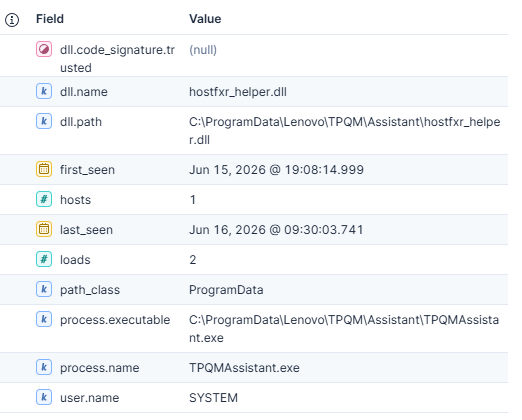
A DLL in ProgramData is not enough by itself. I prefer an aggregate here because the same DLL may be loaded many times, and I want to see distinct DLL/process pairs first. The path_class field is only a helper to keep the path logic readable.
I care about the combination:
- privileged user context
- DLL path writable by standard users
- missing or untrusted signature
- suspicious parent, service or scheduled task relationship
In the lab the hit is clear:
| path_class | dll.name | process | user | trusted |
|---|---|---|---|---|
ProgramData |
hostfxr_helper.dll |
TPQMAssistant.exe |
SYSTEM |
null |
Focused query:
FROM logs-endpoint.events.library-*
| EVAL path = TO_LOWER(dll.path)
| WHERE path LIKE "*programdata*lenovo*tpqm*assistant*"
| KEEP @timestamp, host.name, user.name, process.name, process.executable, dll.name, dll.path, dll.code_signature.trusted
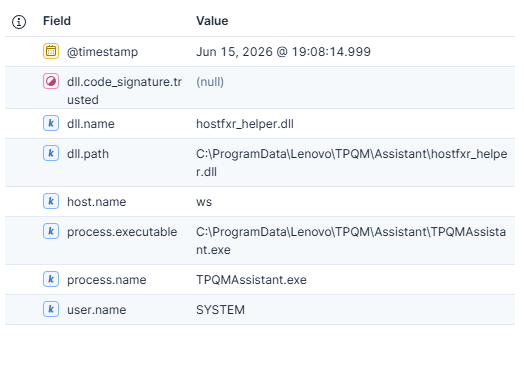
Lab hit:
| user | process | dll.name | dll.path |
|---|---|---|---|
SYSTEM |
TPQMAssistant.exe |
hostfxr_helper.dll |
C:\ProgramData\...\hostfxr_helper.dll |
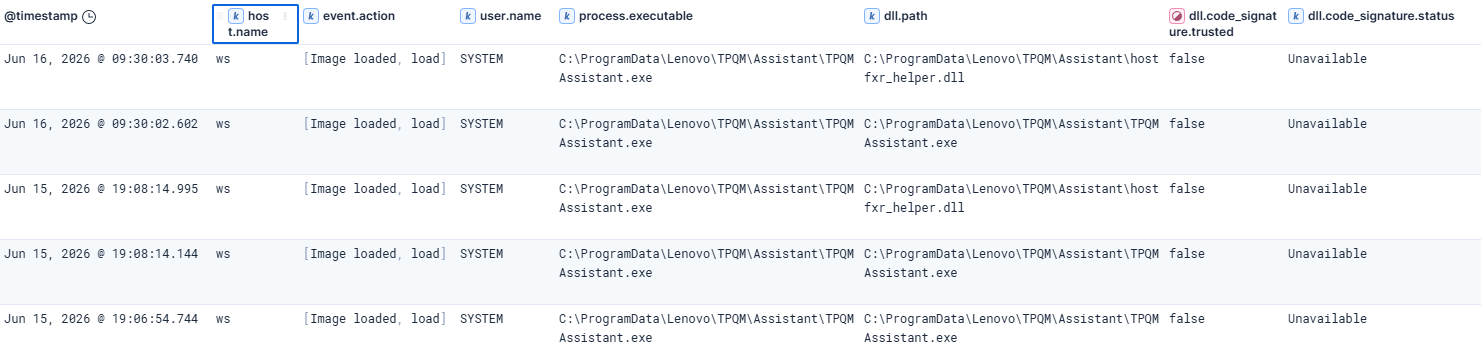
Sysmon can show the same thing with Event ID 7:
FROM logs-windows.sysmon_operational-*
| WHERE event.code == "7"
| EVAL path = TO_LOWER(dll.path), user_l = TO_LOWER(user.name)
| WHERE user_l IN ("system", "local service", "network service")
| WHERE path LIKE "*programdata*lenovo*tpqm*assistant*"
| KEEP @timestamp, host.name, event.code, event.action, user.name, process.name, process.executable, dll.name, dll.path, dll.hash.sha256, dll.code_signature.trusted, dll.code_signature.status
Sysmon view:
| code | user | process | dll.path |
|---|---|---|---|
7 |
SYSTEM |
TPQMAssistant.exe |
C:\ProgramData\...\hostfxr_helper.dll |
Then I confirm the scheduled task. The original repo has several scheduled task hunts, especially for actions pointing into user-writable paths:
Generic ES|QL for task creation. TaskContent is XML, so <command> is just the lowercased <Command> action tag:
FROM logs-system.security-*
| WHERE event.code == "4698"
| EVAL task_content = TO_LOWER(winlog.event_data.TaskContent)
| WHERE task_content LIKE "*<command>*programdata*" OR task_content LIKE "*<command>*systemtemp*" OR task_content LIKE "*<command>*appdata*local?temp*" OR task_content LIKE "*<command>*windows?temp*" OR task_content LIKE "*<command>*users*downloads*" OR task_content LIKE "*<command>*users*desktop*"
| WHERE NOT task_content LIKE "*<command>*programdata*microsoft*windows defender*"
| KEEP @timestamp, host.name, user.name, winlog.event_data.SubjectUserName, winlog.event_data.TaskName, winlog.event_data.TaskContent
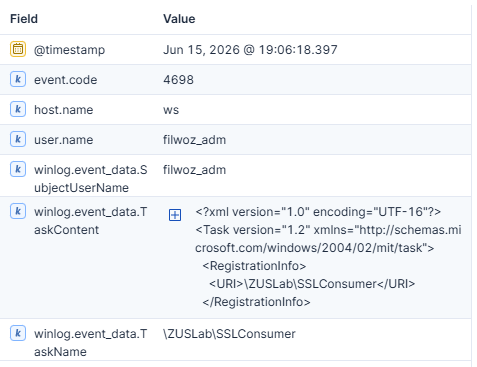
In this lab, Security 4698 gives the task object to inspect next:
| @timestamp | user | task | command |
|---|---|---|---|
2026-06-15 17:05:45 |
filwoz_adm |
\TPQM\ActivationDailyScheduleTask |
C:\ProgramData\...\TPQMAssistant.exe |
OSQuery:
SELECT path, principal, type, access
FROM ntfs_acl_permissions
WHERE path = 'C:\ProgramData\Lenovo\TPQM\Assistant'
  AND principal IN ('CREATOR OWNER','BUILTIN\Users','Users','Authenticated Users','Everyone');
SELECT name, path, action, enabled, state
FROM scheduled_tasks
WHERE name LIKE '%ActivationDailyScheduleTask%' OR action LIKE '%TPQMAssistant%';
OSQuery result:
Scheduled task:
| task | action | state |
|---|---|---|
ActivationDailyScheduleTask |
C:\ProgramData\...\TPQMAssistant.exe |
ready |

Directory ACL:
| path | principal | access |
|---|---|---|
C:\ProgramData\...\Assistant |
Users |
Specific Rights All,Delete,... |
C:\ProgramData\...\Assistant |
CREATOR OWNER |
Generic All |

Elastic Defend read-only validation command:
The marker file is lab-only. The exposure evidence is the privileged task, the writable directory and the DLL load path.
cmd.exe /c icacls C:\ProgramData\Lenovo\TPQM\Assistant & dir C:\ProgramData\Lenovo\TPQM\Assistant & type C:\poc\lab02_target_ran.txt
Lab validation output. The local privileged DLL load is already shown in telemetry as user.name == "SYSTEM"; this marker only proves the lab application attempted to load the helper DLL:
C:\ProgramData\Lenovo\TPQM\Assistant BUILTIN\Administrators:(WD)
                                     CREATOR OWNER:(OI)(CI)(IO)(WD)
                                     BUILTIN\Users:(OI)(CI)(M)
                                     BUILTIN\Users:(I)(CI)(WD,AD,WEA,WA)
                                     [...]

 Directory of C:\ProgramData\Lenovo\TPQM\Assistant

06/15/2026  07:01 PM            30,208 hostfxr_helper.dll
06/15/2026  07:04 PM             3,584 TPQMAssistant.exe

2026-06-15 19:08:14Z  target started, runningAs=SYSTEM
2026-06-15 19:08:15Z  LoadLibrary(hostfxr_helper.dll) handle=140707717840896
2026-06-16 09:30:03Z  target started, runningAs=SYSTEM
2026-06-16 09:30:03Z  LoadLibrary(hostfxr_helper.dll) handle=140707692085248
Hunt 3: OpenSSL Config and Provider Paths
The OpenSSL case is a little different. An OpenSSL DLL load is not a vulnerability by itself.
The vulnerable condition is a chain:
- A privileged process initializes OpenSSL.
- That OpenSSL build looks for config or provider material in a default path such as
C:\usr\local\sslorC:\etc\ssl. - That path is writable by standard users.
openssl.cnfpoints OpenSSL at an engine or provider DLL from that writable location.- The privileged process loads that DLL in its own context.
If the process only loads libcrypto or libssl, I do not call it vulnerable. The application must actually load config or provider material. Seeing a privileged process load an unexpected DLL from a writable OpenSSL path is much stronger evidence.
The repository has three relevant starting points:
I start with inventory. This finds privileged processes that use OpenSSL and gives me the DLL version and path to inspect next:
FROM logs-endpoint.events.library-*
| EVAL dll_name = TO_LOWER(dll.name), user_l = TO_LOWER(user.name)
| WHERE dll_name LIKE "libcrypto*" OR dll_name LIKE "libssl*" OR dll_name LIKE "libeay*" OR dll_name LIKE "ssleay*" OR dll_name == "openssl.dll"
| WHERE user_l IN ("system", "local service", "network service")
| STATS loads = COUNT(*), hosts = COUNT_DISTINCT(host.name), first_seen = MIN(@timestamp), last_seen = MAX(@timestamp)
  BY dll.name, dll.path, dll.pe.file_version, process.executable, user.name
| SORT loads DESC
I use this to find applications that load OpenSSL and DLLs worth checking. On older builds, names like libeay32.dll, ssleay32.dll and libcrypto-1_1*.dll get priority. For newer builds I still need the path, version and consumer process because the next question is where the config/provider directory points.
This part uses Endpoint library telemetry. It is the right source for loaded DLLs and providers. I still use Windows Security or Sysmon later to explain why a privileged process reached this path.

After inventory I hunt for runtime engine or provider loads from risky OpenSSL paths. I keep this path list tight because a pattern like *openssl*ssl* also matches normal installs under C:\Program Files\OpenSSL-Win64:
FROM logs-endpoint.events.library-*
| EVAL path = TO_LOWER(dll.path), user_l = TO_LOWER(user.name)
| WHERE path LIKE "*usr*local*ssl*" OR path LIKE "*etc*ssl*" OR path LIKE "*programdata*ssl*"
| WHERE user_l IN ("system", "local service", "network service")
| WHERE dll.code_signature.trusted != true OR dll.code_signature.trusted IS NULL
| KEEP @timestamp, host.name, user.name, process.name, process.executable, dll.name, dll.path, dll.code_signature.trusted
In the lab this catches:
| host | user | process | dll.path |
|---|---|---|---|
ws |
SYSTEM |
openssl.exe |
C:\usr\local\ssl\evil_engine.dll |

File writes are the prioritization layer. They tell me whether users are actually placing config or DLL files in those exposed directories:
FROM logs-endpoint.events.file-*
| EVAL path = TO_LOWER(file.path), user_l = TO_LOWER(user.name)
| WHERE path LIKE "*usr*local*ssl*" OR path LIKE "*etc*ssl*" OR path LIKE "*programdata*ssl*"
| WHERE file.extension IN ("cnf", "dll", "config")
| WHERE NOT user_l IN ("system", "local service", "network service", "trustedinstaller")
| KEEP @timestamp, host.name, user.name, event.action, process.name, process.executable, file.path, file.extension, file.hash.sha256
Lab hits:
| user.name | event.action | file.path |
|---|---|---|
filwoz |
overwrite |
C:\usr\local\ssl\openssl.cnf |
filwoz |
creation |
C:\usr\local\ssl\p_minimal.dll |
filwoz |
overwrite |
C:\usr\local\ssl\evil_engine.dll |
Windows Security 4698 gives task creation context. I do not rely only on TaskContent here. In some pipelines it can be truncated, but the task name, creator and process telemetry still give enough context:
FROM logs-system.security-*
| WHERE event.code == "4698"
| EVAL task = TO_LOWER(winlog.event_data.TaskName), content = TO_LOWER(winlog.event_data.TaskContent)
| WHERE task LIKE "*ssl*" OR task LIKE "*openssl*" OR content LIKE "*openssl*" OR content LIKE "*usr*local*ssl*" OR content LIKE "*etc*ssl*"
| KEEP @timestamp, host.name, event.code, user.name, winlog.event_data.SubjectUserName, winlog.event_data.TaskName, winlog.event_data.TaskContent
Security view:
| host | user | task |
|---|---|---|
ws |
filwoz_adm |
\ZUSLAB\SSLConsumer |
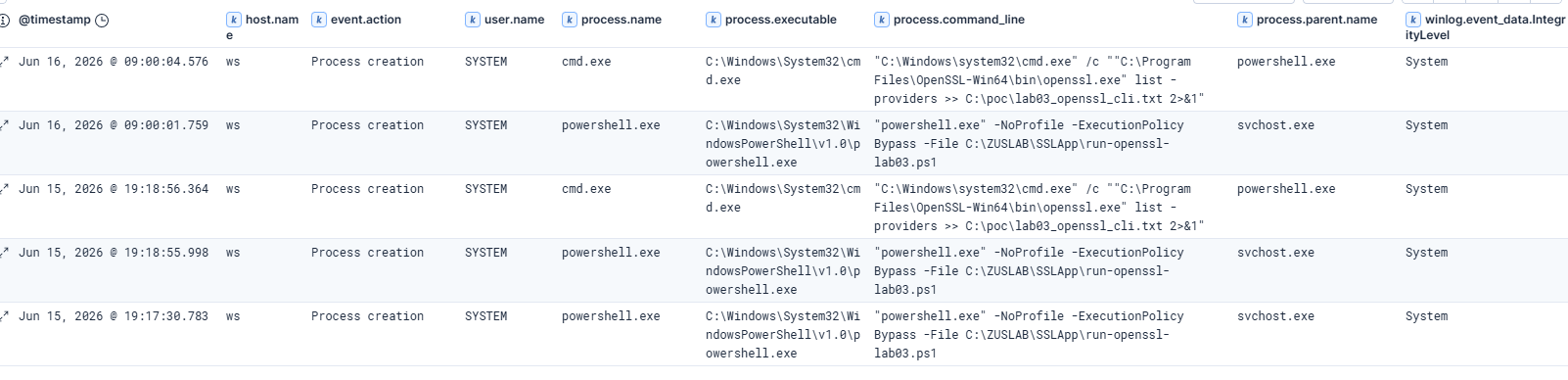
Endpoint process telemetry then proves that the scheduled task path resulted in a privileged OpenSSL execution:
FROM logs-endpoint.events.process-*
| EVAL cmd = TO_LOWER(process.command_line), exe = TO_LOWER(process.executable), user_l = TO_LOWER(user.name)
| WHERE user_l IN ("system", "local service", "network service")
| WHERE cmd LIKE "*run-openssl-lab03*" OR exe LIKE "*openssl.exe"
| KEEP @timestamp, host.name, user.name, process.name, process.executable, process.command_line, process.parent.name, process.Ext.token.integrity_level_name
Endpoint process view:
| user | process | parent | command | integrity |
|---|---|---|---|---|
SYSTEM |
powershell.exe |
svchost.exe |
run-openssl-lab03.ps1 |
system |
SYSTEM |
openssl.exe |
cmd.exe |
openssl.exe list -providers |
system |
Sysmon did not emit Event ID 7 or 11 for the OpenSSL provider DLL with my lab config, but it still shows a second process-chain view:
FROM logs-windows.sysmon_operational-*
| WHERE event.code == "1"
| EVAL cmd = TO_LOWER(process.command_line), user_l = TO_LOWER(user.name)
| WHERE user_l IN ("system", "local service", "network service")
| WHERE cmd LIKE "*run-openssl-lab03*" OR cmd LIKE "*openssl.exe*"
| KEEP @timestamp, host.name, event.code, event.action, user.name, process.name, process.executable, process.command_line, process.parent.name, winlog.event_data.IntegrityLevel
Sysmon view:
| code | user | process | parent | command |
|---|---|---|---|---|
1 |
SYSTEM |
powershell.exe |
svchost.exe |
run-openssl-lab03.ps1 |
1 |
SYSTEM |
cmd.exe |
powershell.exe |
openssl.exe list -providers |
OSQuery:
SELECT path, principal, type, access
FROM ntfs_acl_permissions
WHERE path = 'C:\usr\local\ssl'
  AND principal IN ('BUILTIN\Users','Users','Authenticated Users','Everyone');
SELECT f.path, f.size, h.sha256, a.result AS authenticode
FROM file f
LEFT JOIN hash h ON f.path = h.path
LEFT JOIN authenticode a ON f.path = a.path
WHERE f.path IN ('C:\usr\local\ssl\openssl.cnf','C:\usr\local\ssl\evil_engine.dll','C:\usr\local\ssl\p_minimal.dll');
OSQuery result:
Directory ACL:
| path | principal | access |
|---|---|---|
C:\usr\local\ssl |
Users |
Specific Rights All,Delete,... |
C:\usr\local\ssl |
Authenticated Users |
Generic Write,Generic Read,... |

Config and provider files:
| path | sha256 | authenticode |
|---|---|---|
C:\usr\local\ssl\openssl.cnf |
d8f85cc0...ac9667e |
n/a |
C:\usr\local\ssl\evil_engine.dll |
2d7b57fd...01f652d6 |
missing |
C:\usr\local\ssl\p_minimal.dll |
2d7b57fd...01f652d6 |
missing |

Elastic Defend read-only validation command:
Again, the marker file is lab-only. The reusable hunt is the writable OpenSSL path plus a privileged process that consumes it.
cmd.exe /c icacls C:\usr\local\ssl & dir C:\usr\local\ssl & type C:\poc\lab03_openssl_cli.txt
Lab validation output:
C:\usr\local\ssl NT AUTHORITY\Authenticated Users:(OI)(CI)(M)
                 BUILTIN\Users:(OI)(CI)(M)
                 [...]

 Directory of C:\usr\local\ssl

06/09/2026  08:41 AM            32,256 evil_engine.dll
06/15/2026  07:10 PM               403 openssl.cnf
06/09/2026  08:41 AM            32,256 p_minimal.dll

2026-06-15T19:18:56.3578251+02:00 before openssl.exe runningAs=WS$
WARNING: Unable to query provider parameters for lab_provider
Providers:
  default
    name: OpenSSL Default Provider
    version: 4.0.1
    status: active
  lab_provider
2026-06-15T19:18:56.3890708+02:00 after openssl.exe exit=0
One caveat from my lab: Sysmon did not emit Event ID 7 or 11 for the OpenSSL provider DLL with this config. Elastic Defend library telemetry did. Windows Security explained the task creation, Endpoint process telemetry showed openssl.exe as SYSTEM, and Sysmon explained the process chain. This is why I like using multiple telemetry sources for the same hunt.
Generic OSQuery Templates
The broad ES|QL query gives a path, process, service or task name. OSQuery gives the live confirmation.
Directory ACL:
SELECT path, principal, type, access
FROM ntfs_acl_permissions
WHERE path = 'C:\CANDIDATE\DIR'
  AND principal IN ('Users','BUILTIN\Users','Authenticated Users','Everyone','CREATOR OWNER');
Service confirmation:
SELECT s.name, s.path, s.start_type, s.user_account, a.result AS authenticode
FROM services s
LEFT JOIN authenticode a ON s.path = a.path
WHERE s.name = 'SERVICE_NAME'
   OR s.path LIKE '%ProgramData%'
   OR s.path LIKE '%Users%'
   OR s.path LIKE '%Temp%';
Scheduled task confirmation:
SELECT name, path, action, enabled, state
FROM scheduled_tasks
WHERE name LIKE '%TASK_NAME%'
   OR action LIKE '%ProgramData%'
   OR action LIKE '%Users%'
   OR action LIKE '%Temp%';
File hash and signature:
SELECT f.path, f.size, h.sha256, a.result AS authenticode
FROM file f
LEFT JOIN hash h ON f.path = h.path
LEFT JOIN authenticode a ON f.path = a.path
WHERE f.path = 'C:\CANDIDATE\FILE.dll';
Generic Elastic Defend Commands
When ES|QL and OSQuery show a real candidate, response actions are useful for fast validation. I keep these commands read-only unless I am intentionally reproducing something in a lab.
icacls "C:\CANDIDATE\DIR"
dir "C:\CANDIDATE\DIR"
powershell -NoProfile -Command "Get-AuthenticodeSignature 'C:\CANDIDATE\FILE.dll' | Format-List *"
sc qc SERVICE_NAME
schtasks /Query /TN "\TASK\NAME" /V /FO LIST
I use this as an audit-friendly exposure confirmation path:
- SIEM found the candidate vulnerable condition
- OSQuery confirmed the current ACL, service, task or signer state
- Defend response action captured command output from the endpoint
Tuning Notes
These hunts are intentionally broad. They will find noise.
Common false positives:
- installers running from
%TEMP% - Microsoft Defender components under
C:\ProgramData\Microsoft\Windows Defender - OneDrive and browser update directories
- legitimate signed vendor agents in
ProgramData - temporary setup bootstrapper paths
I would not turn the first generic query into a high severity attack alert. I would use it as an exposure hunting view or as a low/medium signal feeding an investigation queue.
Core exposure evidence:
- directory grants
Users,Authenticated UsersorEveryonewrite/modify/full control - service is
AUTO_STARTor task runs asSYSTEM/HighestAvailable - path is a vendor app directory, not just a one-time installer temp path
- privileged process executes or loads from that path
- binary, DLL or config file is unsigned, missing signature or not vendor-owned
Signals that raise priority or suggest follow-up compromise hunting:
- low-privileged user wrote the file first
- later
SYSTEMor high-integrity process executed or loaded it - marker, dropped DLL, suspicious script or unexpected hash appears in that path
- similar exposure appears on many hosts or on high-value systems
Summary
This is why I like Offensive SIEM style hunting: one primitive-oriented query can find real exposure across a large environment.
You do not need to know the exact CVE first. You can hunt for the primitive:
- privileged execution from risky paths
- privileged DLL load from risky paths
- scheduled tasks pointing into writable locations
- OpenSSL libraries using writable config or provider paths
Then you confirm the vulnerable state with OSQuery and Elastic Defend.
The lab examples above are simple, but the workflow is the important part. Start generic, narrow down, confirm ACL and signer, then decide whether the exposure is a real finding or just noise. After that, look for exploitation or compromise traces if the risk justifies it.
Take the queries, adjust the paths to your environment and go hunt. There is usually risk hiding in boring telemetry.
That is how I want to use SIEM more often: find weak spots before someone else does, not just detect attacks that already happened.